Set up Dex step by step

From download to your first fixed request in about 15 minutes, on your own network. Nothing has to be opened to the internet.

Before you start

  • A Windows PC or server on your network that stays switched on: Windows 10 or 11, or Windows Server 2016 or newer (2 GB of free memory and 1 GB of disk are plenty)
  • Administrator rights on that PC and on the staff computers, for the one-time setup
  • Staff computers with Windows 10 or 11, or macOS 11 or newer
  • An iPhone or Android phone for the Dex app
  • About 15 minutes
  1. About 5 minutes

    Install Dex Server

    Pick a Windows PC or server on your network that stays switched on. It becomes the Dex Server: it watches your network and runs the approved fixes.

    • Download Dex-Server-Setup.exe from the free-trial page and run it on that PC
    • Choose the admin password for the Dex panel, and keep it somewhere safe
    • When setup finishes, the Dex panel opens: sign in as admin

    Until Dex's installers are signed, Windows may say “unknown publisher”: choose More info, then Run anyway.

  2. About 3 minutes

    Tell Dex about your company

    The setup screen opens when you first sign in. Dex then scans your network and starts watching what you rely on.

    • Company name, time zone, and the language of the staff help page (English or Georgian)
    • Your network: Dex suggests the one this PC is on
    • Your router, the server your main program uses, your file server, your email provider and the websites you rely on

    Other computers' browsers warn once about Dex's own certificate. Settings → Security shows how to trust it.

  3. About 1 minute per computer

    Set up staff computers

    Windows PCs: in the panel open Settings → Staff PCs → Download Dex Staff Setup, and run it once on each PC as an administrator. It puts the IT help shortcut on the desktop and allows only the approved fixes.

    Macs (macOS 11 or newer): open Terminal and run the one line shown under Settings → Staff PCs → Macs.

    • Many PCs at once: use the silent install line from the same page with Group Policy, Intune or PDQ
    • Laptops keep working with Dex at home and on the road
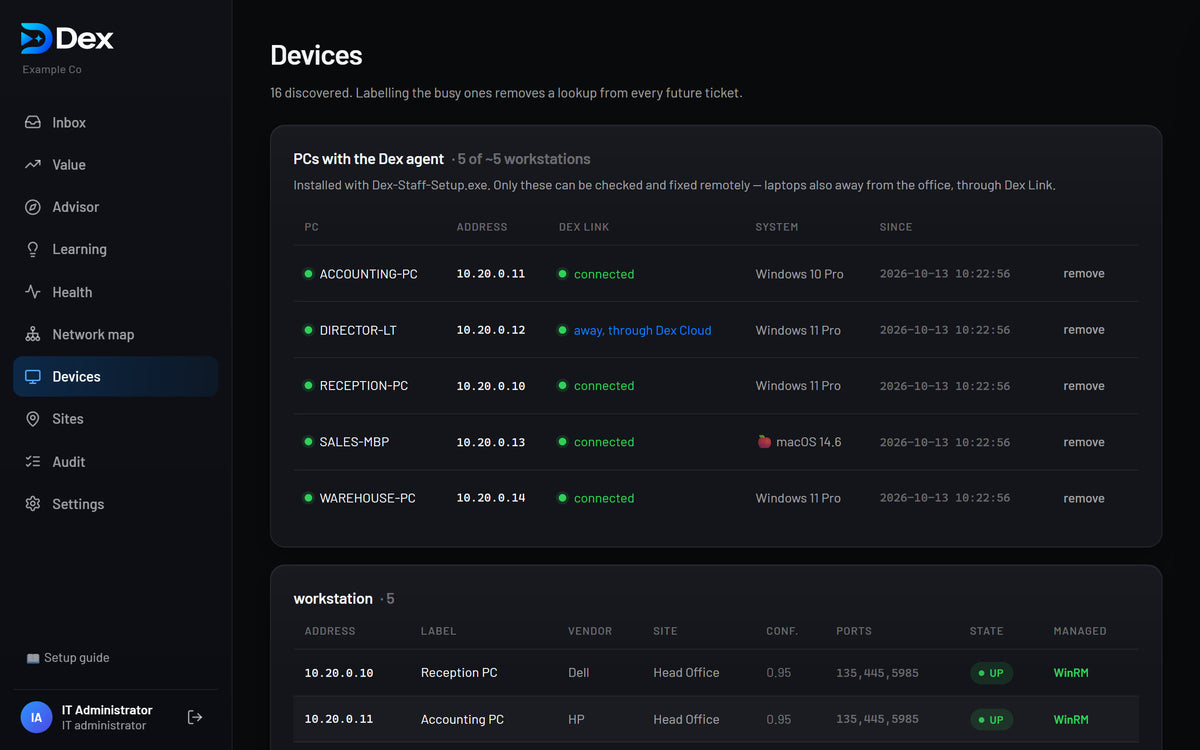
    • The Devices page shows each computer as connected or away
    The Dex panel's Devices page: staff PCs and Macs connected through Dex Link
  4. About 2 minutes

    Pair your phone

    Install the Dex app on your iPhone or Android phone. In the panel open Settings → Dex app → Pair a phone, and scan the QR code with the app.

    • Approve fixes with one tap
    • Get an alert when the internet, a server or a website goes down
    • The morning report arrives on your phone
  5. 1 minute

    Switch fixes on

    Open Settings → Remediation → Enable remediation. Until then Dex diagnoses and proposes fixes, but runs nothing.

    • Every fix still waits for your approval
    • Optional: let Dex run the lowest-risk fixes (clearing a print queue, correcting the clock) without asking
    A help request in the Dex panel: the diagnosis and the fix waiting for approval
  6. 1 minute

    Activate your subscription

    When you buy a plan you receive an order confirmation email. In the panel open Settings → Dex app → Activate a purchase, and enter that email address and the order number.

    • Your trial keeps running until you activate
    • Enterprise customers paying by invoice receive an activation code from us
  7. Optional

    Finishing touches

    A few minutes now save time later.

    • Link your Google or Microsoft work account and invite colleagues: Settings → Sign-in, where available
    • Add a second backup folder on another disk or a NAS: Settings → Backups
    • Trust Dex's certificate on the computers you manage Dex from, then turn on HTTPS only: Settings → Security

Rolling Dex out across a large organisation?

Install the staff setup on every PC at once with Group Policy, Intune or PDQ, using the silent install line under Settings → Staff PCs. For onboarding and training, talk to us about Enterprise.

Stuck on a step? See Dex support.

Video tutorials

See Dex at work

Each one under a minute.

0:51

From a staff member's click to a tested fix

A printer stops. Dex finds why, you approve the fix, and Dex runs it and checks that printing works.

0:37

Approve a fix from your phone

Open a request in the Dex app, see what is wrong, and approve the fix with one tap.

Ready when you are

Free for 7 days on up to 15 PCs, with no card and no sign-up.